Netkiller ISMS 4.2.5 Update Notes

Version: Netkiller ISMS 4.2.5 Update Date: October 27, 2025


Netkiller ISMS 4.2.5 Update Summary

Netkiller ISMS version 4.2.5 is a major update focused on enhancing user experience and strengthening system stability. This release delivers a higher level of information security environment through (1) establishing a more robust security and stability foundation, (2) improving large-scale task processing capabilities and adding key new features, and (3) incorporating user feedback for more intuitive UI/UX improvements.

Above all, we have prioritized reinforcing the system’s security and stability. We’ve comprehensively upgraded the logging library to meet the latest security standards, strengthened database communication security, and made the permission management system more robust. Furthermore, by proactively responding to cloud environment changes, we have secured long-term service stability. Through this, users can utilize the service with greater peace of mind.

The processing capacity and success rate for large-scale external sharing requests have been significantly improved. Requests involving numerous files or recipients are now processed quickly and reliably, enhancing work efficiency. Practical new features have been added to increase management convenience, such as the ability to immediately stop approved shares and set custom times for organization/user synchronization, enabling more flexible and powerful management.

In terms of the User Interface (UI), the file selection method for external sharing has been completely revamped into a Google Drive-like explorer format, making it much easier to find files. The panel resizing function for viewing long filenames has become more convenient, and various improvements reflecting user feedback, such as real-time character count for message input and clearer ‘Full Scan’ progress indication, provide a more intuitive and efficient user experience.

In addition, various improvements have been made throughout the system to enhance stability and data accuracy. With this update, Netkiller ISMS will deliver a safer, faster, and more convenient information security experience.

Netkiller ISMS version 4.2.5 is particularly effective for organizations with the following requirements:

  • Organizations seeking to enhance service reliability by applying the latest security technologies.
  • Organizations that frequently perform large-scale external sharing with numerous files or users and require stable processing performance.
  • Organizations desiring enhanced control functions after external sharing approval (e.g., immediate share termination).
  • Organizations wishing to flexibly manage user information synchronization timing according to workflows.
  • Organizations looking to check policy violation status through integrated reports and improve management efficiency (New Report Feature).
  • Organizations aiming to enhance information security work productivity through a more intuitive and convenient interface.

✨ Enhanced Features and Performance

This update strengthens core system functions and optimizes performance to provide a more stable information security environment, even in large-scale settings.
  • Significant Reinforcement of System Security and Stability:
    • To comply with the latest security standards and enhance security, the core logging system has been safely upgraded, protecting the system from potential security threats.
    • Security for the data transmission process has been strengthened by allowing communication with the database only when encrypted (SSL).
    • Access control for administrator functions has been reinforced, enhancing permission system security by ensuring only authorized administrators can use related functions.
    • The risk of information exposure has been reduced by ensuring sensitive information (e.g., resident registration numbers) potentially included in policy violation notification emails is securely masked.
    • System execution methods have been proactively updated in preparation for future cloud environment changes, ensuring stable, uninterrupted service.
  • Innovation in Large-Scale External Sharing Processing Capacity:
    • Large-scale external sharing requests involving many files and recipients are now processed quickly and reliably. Processing performance for large requests has been significantly increased, boosting user work efficiency.
    • Data consistency is ensured by improving the related logic so that file ownership transfer and inheritance of existing sharing permissions occur accurately during large-scale requests.
    • Email notification content has been improved for clarity, even with many files/recipients. Summary information for external sharing files and recipients is now provided, along with a web link to view the full list.
  • Increased Convenience with New Core Features:
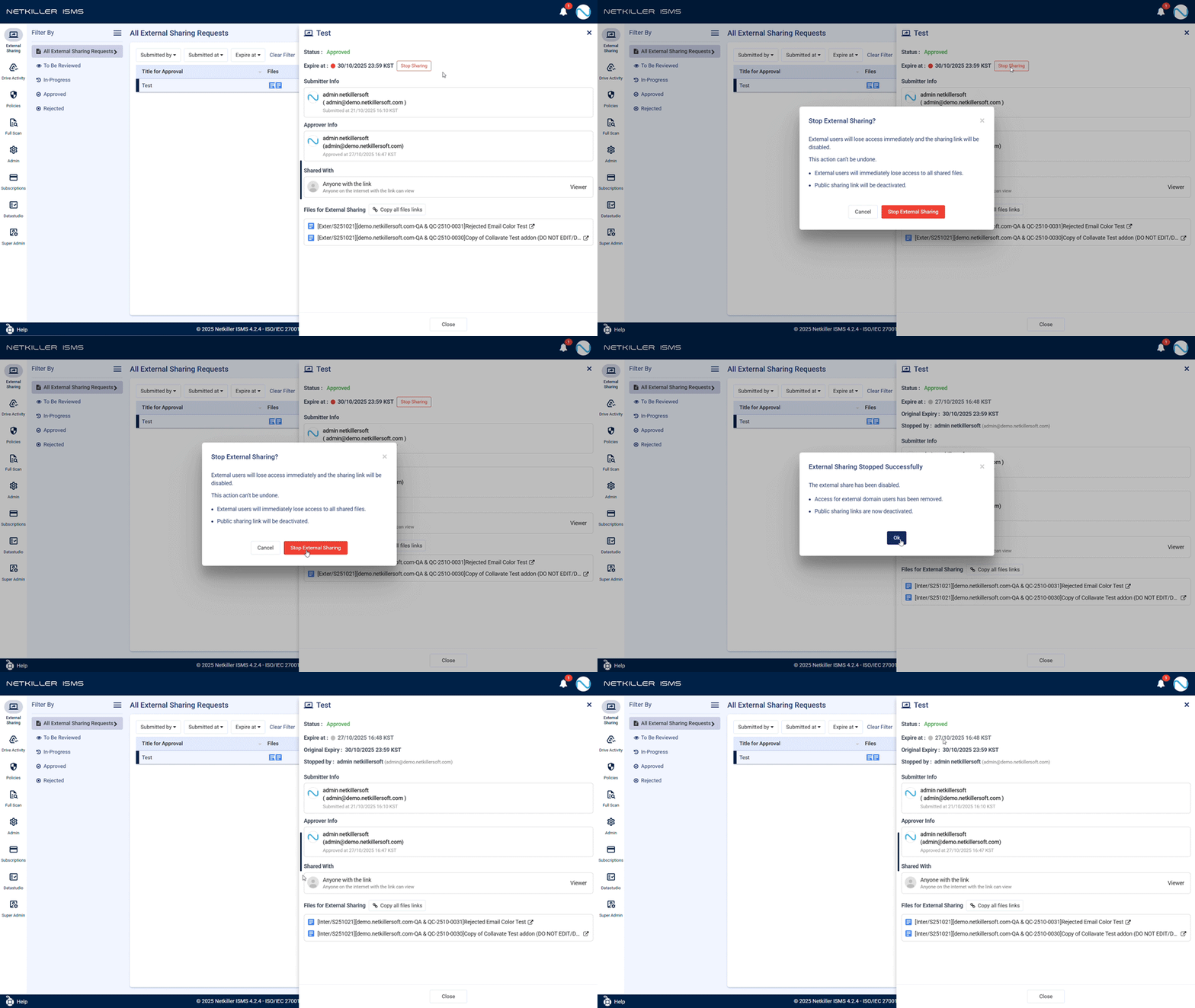
    • ‘Immediate Expiry’ for Approved External Shares: When external sharing is no longer needed, a new control feature allows administrators or requesters to immediately stop the share, enabling proactive management of information leakage risks.
    • Customizable Org/User Auto-Sync Time: Administrators can now directly set the time for automatic synchronization of organization and user information according to their work hours, supporting immediate system access for new hires, etc.
    • Policy-Detected File Report: A dedicated report page has been added to check the list of files detected by policies in one place and filter them by various criteria, making policy violation status management easier. (Initially applied for Remember customer)
    • Automated Initial Settings for New Users: Language, time zone, etc., are automatically set for new users upon their first login, reducing the hassle of initial setup and allowing them to start using the system immediately.
  • Improved System Efficiency and Accuracy:
    • Optimized Weekly Report PDF File Size: The PDF generation method has been improved to drastically reduce the size of weekly report files, allowing users to check and store reports without email capacity concerns.
    • Improved GWS Drive Log Sync Speed: Intermittent synchronization delays that occurred during temporary spikes in Google Workspace Drive log traffic have been addressed, allowing users to check the latest activity history more quickly and reliably.
    • Optimized Internal System Resource Utilization: System load has been reduced and overall response speed improved by eliminating unnecessary internal API calls.
    • Enhanced Database Performance and Stability: Data processing speed for major functions has been increased, and the database connection management method has been optimized for stable service operation.
    • Strengthened Background Automation Stability: Issues where background tasks like automatic notifications were delayed under certain conditions have been improved, ensuring stable execution of automated processing functions.

🎨 User Interface (UI) Improvements

Reflecting user feedback, we’ve improved the screen configuration for greater convenience and intuitiveness. Various elements, including file browsing, screen operation, and guidance text, have been refined for enhanced usability and completeness.
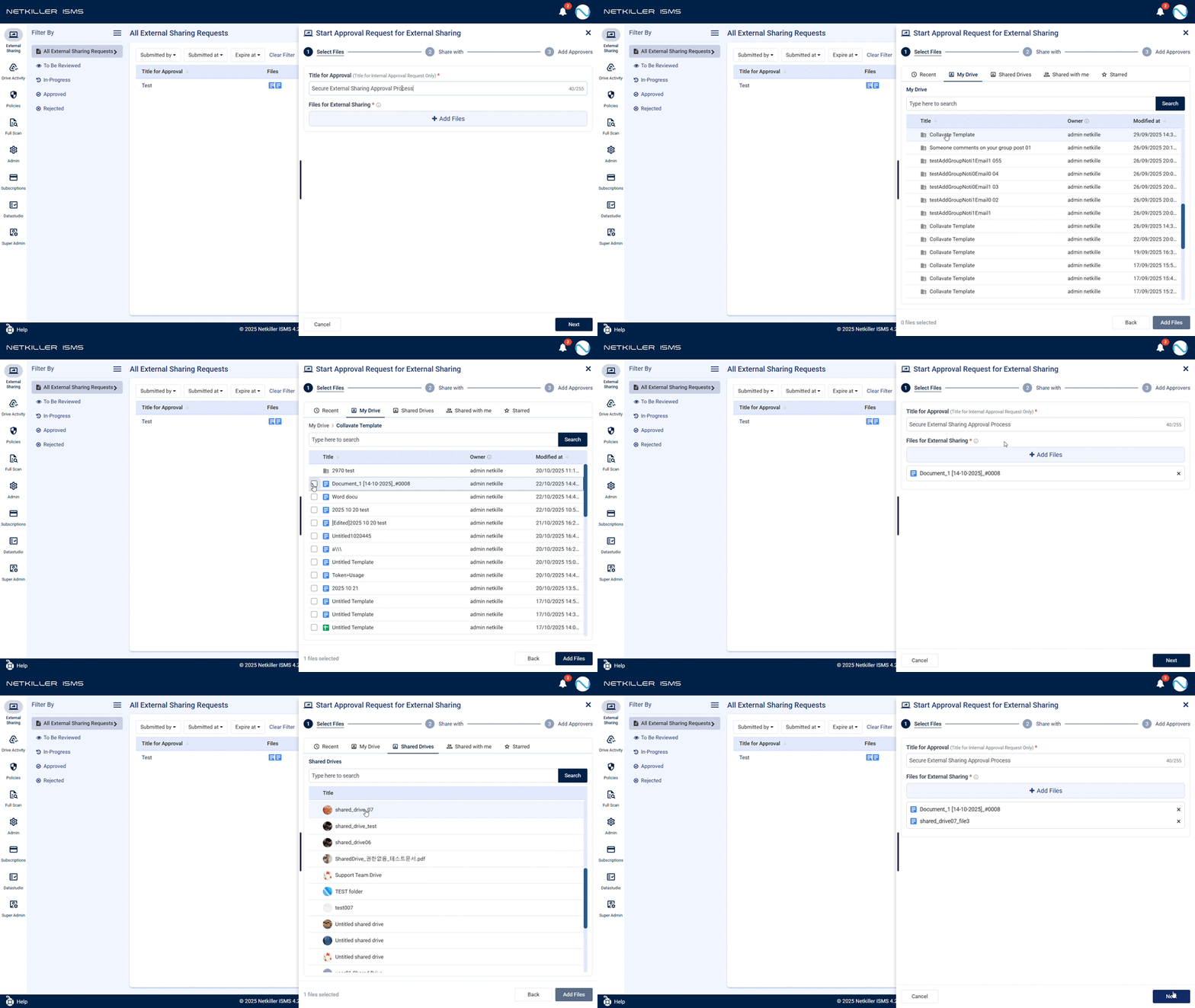
  • Revolutionized External Sharing Request Experience:
    • Convenient File Browsing like Google Drive: The file selection method for external sharing has been renewed with a Drive-like explorer UI. Users can browse the folder structure, find files, and use search/sort functions to quickly select desired files.
    • Resizable Side Panel: The width of the panel for external sharing requests/confirmations can be freely adjusted by the user, and the setting is saved for future use. Long filenames can be viewed at a glance.
    • Submit External Sharing Approval Request Easily with ‘Link Sharing Only’: The usage method has become more flexible, as external sharing requests can now be submitted by selecting only the ‘Allow link sharing’ option without entering recipient emails.
    • Enhanced Input Stability and Convenience: A real-time character count (max 255 characters) is displayed when entering messages or titles, making it easy to check the input range. Stability has been strengthened to prevent the screen from breaking or freezing even when entering long phrases.
    • More Natural Korean Expressions: Korean expressions related to permission settings on the external sharing request screen have been refined for better readability.
    • Improved Approver Addition Convenience: If an approver is already registered, they can now be added immediately just by entering their email, without needing the dropdown.
    • Improved Shared Recipient List Check: Tooltip display has been enhanced so the full list of names can be checked at a glance, even with many shared recipients.
  • Improved ‘Full Scan’ Feature Usability:
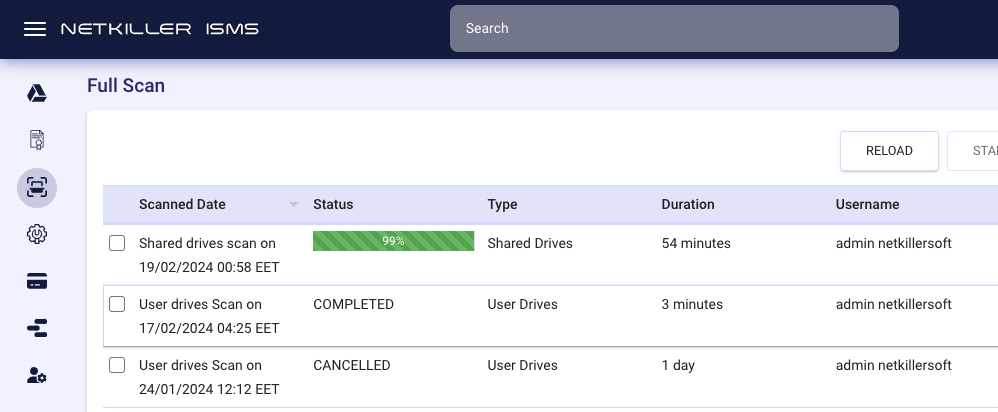
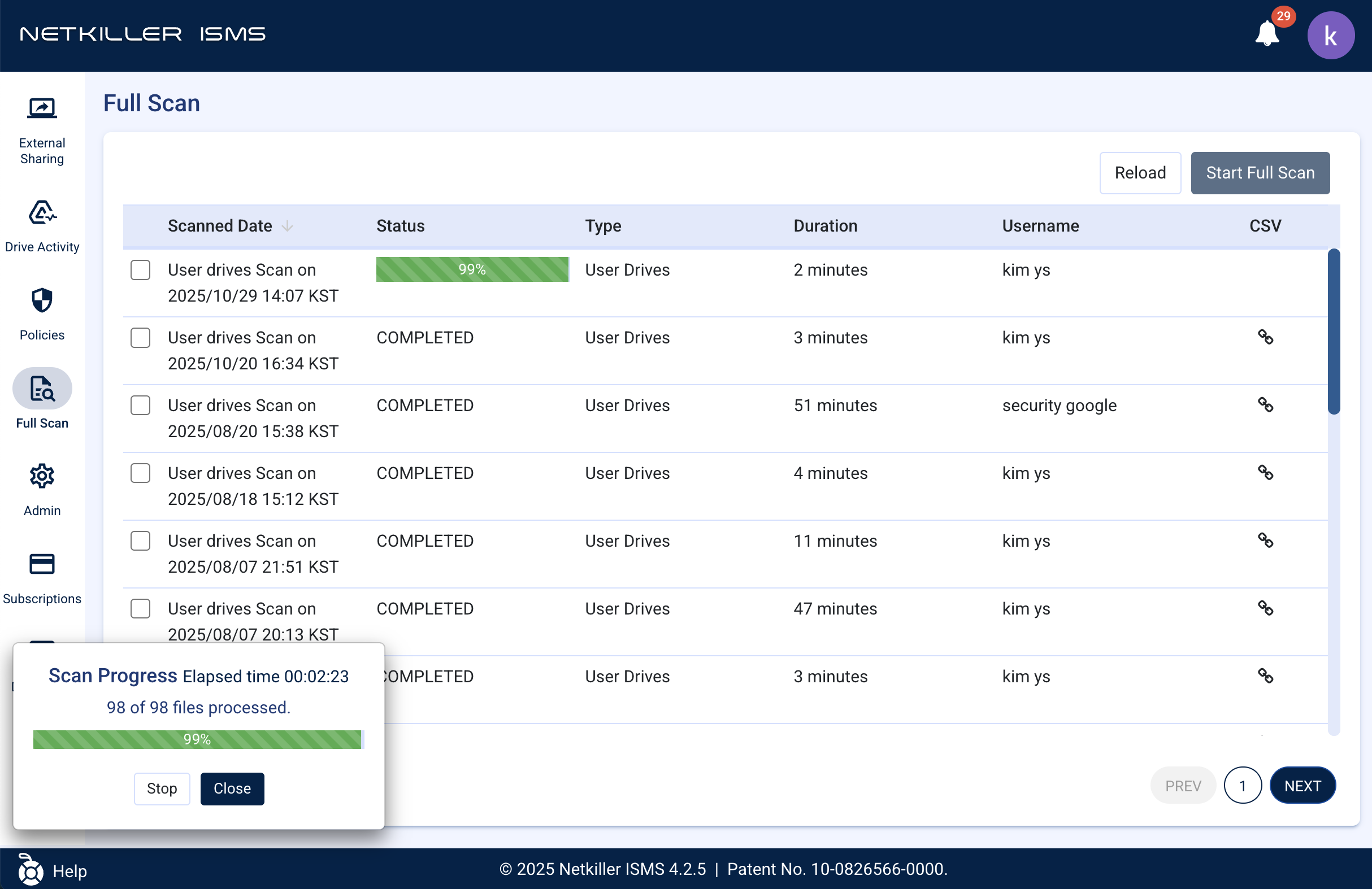
    • Clearer Progress Status: The guidance messages and progress display method shown when running a ‘Full Scan’ have been improved, allowing users to grasp the work status more clearly and intuitively.
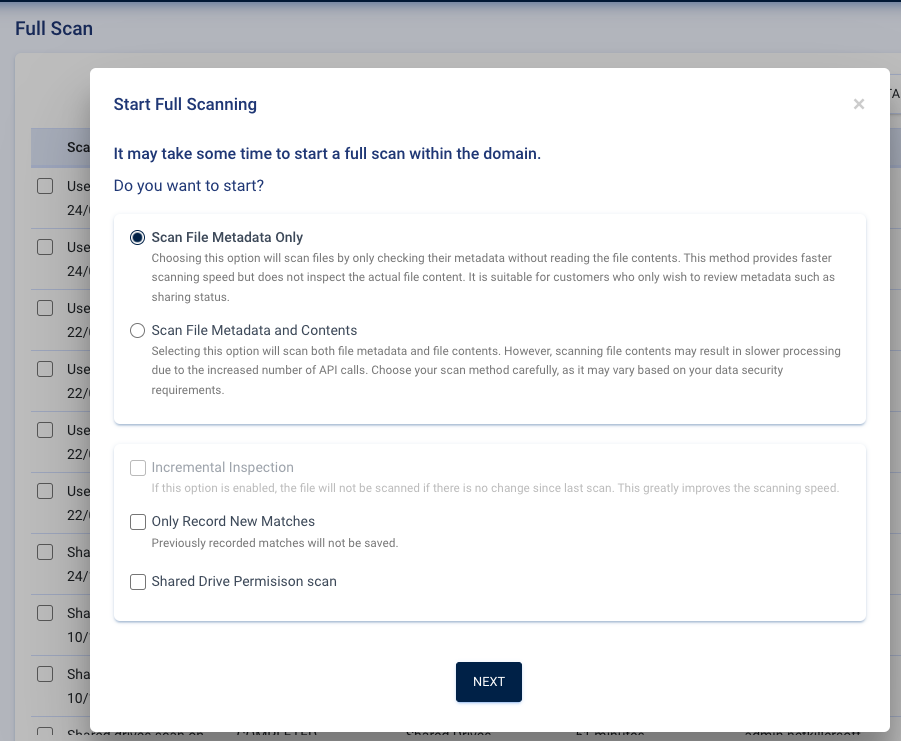
    • Enhanced Korean Guidance Display Quality: Issues where Korean guidance text was cut off in the ‘Start Full Scan’ modal have been resolved, ensuring all text displays normally.
    • Improved Tooltip Display: Visual priority has been adjusted so that guidance tooltips are not hidden behind buttons.
  • Overall UI Consistency and Convenience Enhancements:
    • Unified Page Navigation Buttons: The design and position of page navigation buttons at the bottom of all list screens have been standardized for consistency.
    • Added Sorting for ‘Policy’ List: Management efficiency has been increased by adding the ability to conveniently sort the ‘Policy’ list based on activation status (ON/OFF).
    • Improved Guide for First-Time Users: The position of the guide popup displayed upon first login has been adjusted so it doesn’t obstruct menus.
    • Enhanced Screen Transition Quality: The UI flickering phenomenon that occurred when navigating to certain screens has been eliminated, providing a more visually stable experience.
    • Updated Login Page Information: Information in the footer at the bottom of the login page has been updated to the latest status.
    • Clear Logo Display: The issue where the background appeared black when uploading a transparent background logo in company information settings has been fixed, ensuring the logo displays clearly as intended.
    • Improved Text Display Accuracy: Issues where some guidance text was cut off or omitted have been corrected.

🔧 Stability and Reliability Enhancements

Overall system stability and data accuracy have been strengthened to provide a reliable service environment at all times.

  • Improved Data Accuracy and Management Efficiency:
    • Enhanced Organization Info Sync Accuracy: Improvements prevent duplicate organization information from being generated, ensuring the system always maintains the latest accurate status.
    • Improved File Activity Log Accuracy: The system has been improved to accurately record file activity status during specific policy executions, preventing confusion during audit tracking and status checks.
    • Improved ‘Full Scan’ Time Display: The display of scan progress time has been improved to match the actual work, increasing management efficiency.
  • Enhanced External Sharing Function Stability and Convenience:
    • Stability Assured with Auto-Recovery of Request Folder: Stability has been enhanced by ensuring the system automatically recovers the internal folder used for external sharing requests if it’s accidentally deleted, allowing the request process to continue smoothly without interruption.
    • Ability to Check Request History: The issue preventing navigation to the next page when the external sharing request list was long has been resolved, allowing users to check all request details without omission.
  • Consistent and Stable User Experience:
    • User Status Changes Reflected Immediately: Login sessions for deactivated users are now terminated immediately, enhancing the accuracy of account management.
    • Improved UI Operation Stability: The system now operates smoothly without freezing in various situations, such as dealing with popup windows or long text input.
    • Strengthened Input Validation: Areas where unintended input values were allowed, such as adding non-existent users during ‘Full Scan’, have been improved, enhancing data processing accuracy.
    • Improved UI Display Quality: UI display errors, such as popup scrolling being unavailable under certain conditions or header logo images appearing broken, have been corrected.
    • Stabilized Backend Logic: Backend logic stability has been strengthened for processes like specific date selections or email dispatching.

Netkiller ISMS 4.2.5 has evolved into a more powerful and reliable information security solution based on valuable customer feedback. We will continue to strive to provide the best value through ongoing improvements.

Thank you very much.

Netkiller ISMS 4.2.3 Release Note

  1. Integration of AI-based OCR optimized for secure environments
  2. Improved stability for external sharing approvals
  3. Enhanced policy detection and user experience
  4. Various bug fixes and language corrections
  • Process large volumes of documents and images containing personal or financial data
  • Require approval-based access control during external collaboration
  • Use security management tools across mobile, tablet, and various screen sizes
  • Need accurate and actionable alerts for policy violations and security events

1. Feature Improvements

  • Introduction of AI-Powered Netkiller OCR
    A newly enhanced OCR system combines Netkiller’s proprietary AI model, trained specifically for security environments, with the Google Vision API. This integration significantly improves the detection accuracy of sensitive information within images and documents.
    This innovation was recognized as the Grand Prize Winner of the 2025 Google AI Launchpad Solution Competition.
  • Enhanced Email Validation for External Sharing Requests
    Invalid or non-existent email addresses are now blocked during external sharing requests.
    An issue where a single invalid recipient caused the entire sharing process to fail has also been resolved.
  • Automatic Update of Approver Roles
    When synchronizing accounts in the admin console, the list of approvers now updates in real-time without requiring a manual page refresh.
  • Improved Real-Time Policy Alert Links
    The “View in Netkiller ISMS” button in alert emails now directly opens the detailed view of the relevant file for faster and more efficient review.
  • Responsive UI for Mobile and Tablet
    A fully responsive layout has been applied to optimize usability across mobile, tablet, and various screen sizes, providing a consistent user experience.
  • Keyword Regex UI Enhancement
    In policy and full-scan views, button sizes now automatically adjust based on keyword length, improving readability and layout alignment.
  • Improved Search UX
    On the Drive Activity Log screen, pressing Enter with an empty search field now resets the filters, streamlining user navigation.

3. Bug Fixes

  • Regex Backslash () Error Fixed in Test type box
    An issue where regex patterns containing backslashes (\) were not correctly recognized in the regex test box following keyword input has been fixed.
    This improvement ensures accurate and stable pattern validation during testing.
  • Stability for Multi-Tab Sharing Approvals
    Simultaneous approvals or rejections from multiple browser tabs now properly reflect only the first confirmed action, preventing inconsistent states.
  • CSV Download Email Formatting Fix
    Emails sent after downloading Drive audit logs now display correct formatting and attachment structure.
  • Miscellaneous Typo Corrections
    Minor typos in the UI and documentation have been corrected to ensure language clarity and consistency.

Final Winner of Google’s AI Launchpad Contest 2025

Netkiller has been named the Final Winner of Google’s 2025 AI Launchpad Contest. Our success was driven by the integration of cutting-edge AI technologies into our products. 

Netkiller ISMS will continue to evolve by adopting the latest AI advancements to safeguard the security of our customers’ Google Drive environments. 

Thank you for your continued support.

넷킬러, LA 대화재 피해 현지 한국인기업을 위한 긴급 지원 활동을 시작합니다.

Hotline: 415-212-8995, Ext 2  

La-wildfire@netkiller.com

최근 LA 지역을 강타한 대규모 화재로 인해 수많은 기업, 특히 한인 기업들이 막대한 피해를 입었습니다. 화재로 사업장과 설비가 소실되고, 무엇보다 데이터 손실로 인해 비즈니스 운영에 심각한 차질이 빚어지고 있습니다. 이는 기업의 존폐를 위협할 수 있는 중대한 문제입니다.

이에 Google Cloud Premier Partner이자 미주 최대 한인 경제 단체 중 하나인 KITA(남가주 지부) 회원사인 넷킬러는 LA 대화재 피해를 입은 한인 기업의 신속한 재해 복구와 비즈니스 정상화를 위해 “LA 대화재 피해 한인 기업을 위한 재해 복구 지원 센터”를 긴급 론칭합니다.

넷킬러는 작년부터 Google LA 오피스에서 한인 기업 대상 Google Cloud 행사를 다수 주최하는 등 한인 커뮤니티와 긴밀히 협력해 왔습니다. 이러한 경험을 바탕으로 이번 재해 복구 지원에 중추적인 역할을 수행할 것입니다. 또한, Google 본사 및 현지 팀들과도 긴밀히 협력하여 지원 활동을 펼쳐나갈 예정입니다.

본 지원 센터는 Google의 기술과 솔루션을 기반으로 다음과 같은 긴급 지원 프로그램을 제공합니다.

Hotline: 415-212-8995, Ext 2  La-wildfire@netkiller.com

header

1. 긴급 데이터 백업 및 복구 지원 (Google Cloud Storage 및 Transfer Appliance 활용)

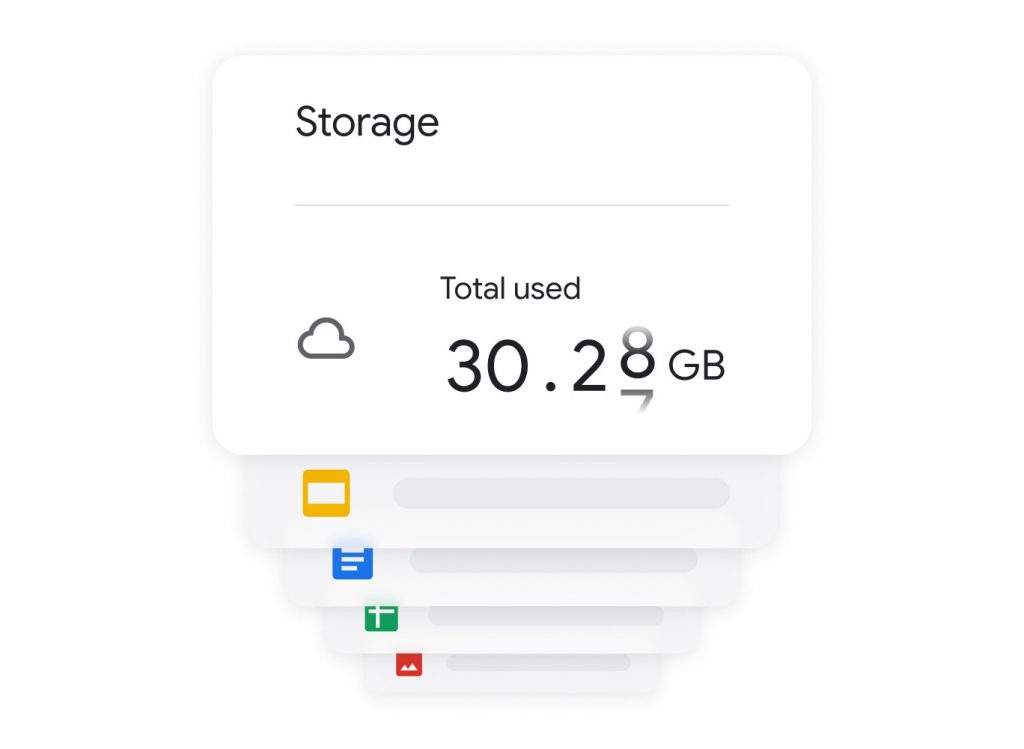
화재로 인해 데이터 손실 위기에 처한 기업들을 위해, 추가 자연 재해에도 데이터 안전성과 보안을 보장하는 Google Cloud로의 신속한 데이터 이전을 지원합니다. 

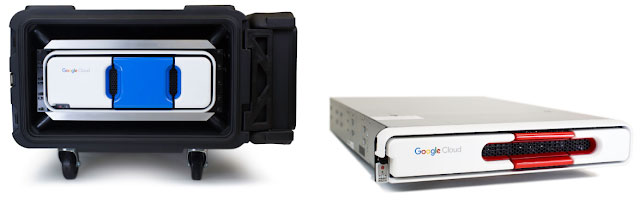
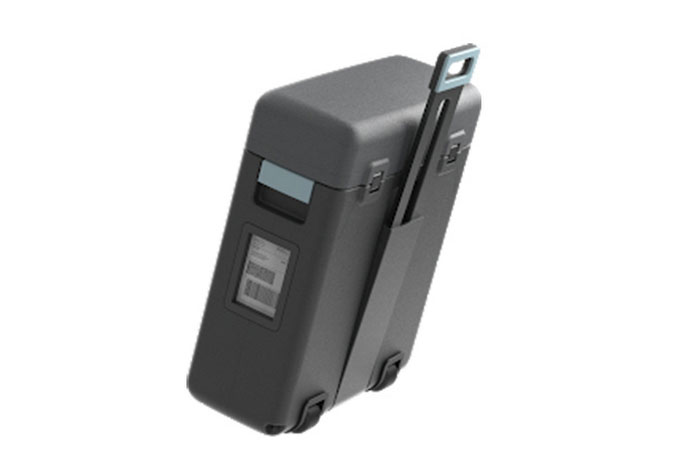
이를 위해 대용량 데이터의 초고속 Google Cloud Storage 및 Google Drive 이전을 위해 Google과 협력합니다. 특히, 피해 기업들이 수 주를 기다릴 여유가 없다는 점을 감안하여, Google Transfer Appliance를 최우선 배정하고 항공 및 육로를 통해 긴급 배송할 계획입니다.

2. 기업용 유선 전화번호의 클라우드 이전 (Google Voice 활용)

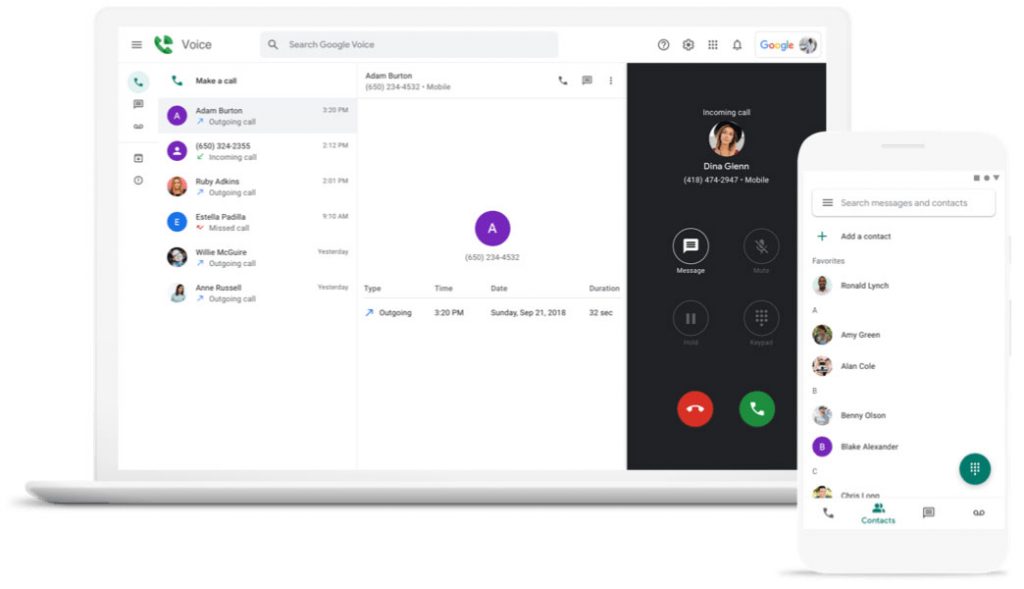
화재로 유선 전화망이 소실된 기업의 고객 연락 두절 등 2차 피해를 방지하기 위해, 기존 유선 전화번호를 24시간내 Google Voice로 신속하게 이전(Porting)하여 비즈니스 연속성을 확보하도록 지원합니다.

넷킬러는 이미 LA 현지에 위치한 Google 각 팀에 긴급 협조를 요청하였으며, 피해 한인 기업들이 하루빨리 재기하고 비즈니스를 정상화할 수 있도록 최선을 다해 지원할 것입니다.

Hotline: 415-212-8995, Ext 2  

La-wildfire@netkiller.com

Netkiller Launches Emergency Support for Korean Businesses Affected by Greater Los Angeles Wildfires

Hotline: 415-212-8995, Ext 2  La-wildfire@netkiller.com

The recent devastating wildfires in Los Angeles have inflicted severe damage on numerous businesses, particularly Korean American-owned enterprises. Many have suffered the loss of their workplaces, equipment, and, critically, data, leading to significant disruptions in business operations. This data loss poses a serious threat to the survival of these businesses.

In response, Netkiller, a Google Cloud Premier Partner and a member of KITA (Korean International Trade Association, Southern California Chapter), one of the largest Korean economic organizations in the Americas, is urgently launching the “Disaster Recovery Support Center for Korean Businesses Affected by the LA Wildfires.” This center aims to provide rapid disaster recovery and business continuity support to Korean businesses impacted by the fires.

Netkiller has been actively collaborating with the Korean business community, including hosting multiple Google Cloud events for Korean businesses at the Google LA office since last year. Leveraging this experience, Netkiller will play a pivotal role in these disaster recovery support efforts. We are also working closely with Google headquarters and local teams to provide comprehensive support.

The Support Center will offer the following emergency support programs, powered by Google’s technology and solutions:

1. Emergency Data Backup and Recovery Support (Utilizing Google Cloud Storage and Transfer Appliance)

To assist businesses facing data loss due to the fires, we will facilitate rapid data migration to Google Cloud, ensuring data security and protection against further natural disasters. We will collaborate with Google to expedite the transfer of large volumes of data to Google Cloud Storage and Google Drive with high speed. Recognizing the urgency, we will prioritize the allocation of Google Transfer Appliances and arrange for their expedited delivery via air and ground transportation, as affected businesses cannot afford to wait weeks for delivery.

2. Business Telephone Number Cloud Migration (Utilizing Google Voice)

To prevent secondary damage such as loss of customer contact due to landline outages caused by the fire, we will help businesses quickly port their existing landline numbers to Google Voice within 24 hours, ensuring business continuity.

Netkiller has already requested urgent assistance from relevant Google teams located in LA and will do its utmost to support the swift recovery and business normalization of affected Korean businesses.

Hotline: 415-212-8995, Ext 2  La-wildfire@netkiller.com

Netkiller ISMS 4.1 Release: Enhanced Security Features for Comprehensive Data Protections

We are pleased to announce the release of Netkiller ISMS version 4.1! This upgrade has added and enhanced various features to strengthen information security management and improve user convenience.

A key feature of Netkiller ISMS 4.1 is the option to scan the metadata of all files within the domain, shared drives, and files shared from external sources, including their sharing status, permissions, and link sharing status. This feature represents a significant improvement in speed, over 100 times faster than previous file content audits. It enables users to verify permissions for all files and ensure that access to sensitive information is granted only to authorized users.

Additionally, the design has been improved to provide progress details of full scans, and a feature to download large-scale full scan results has been added to enhance security monitoring.

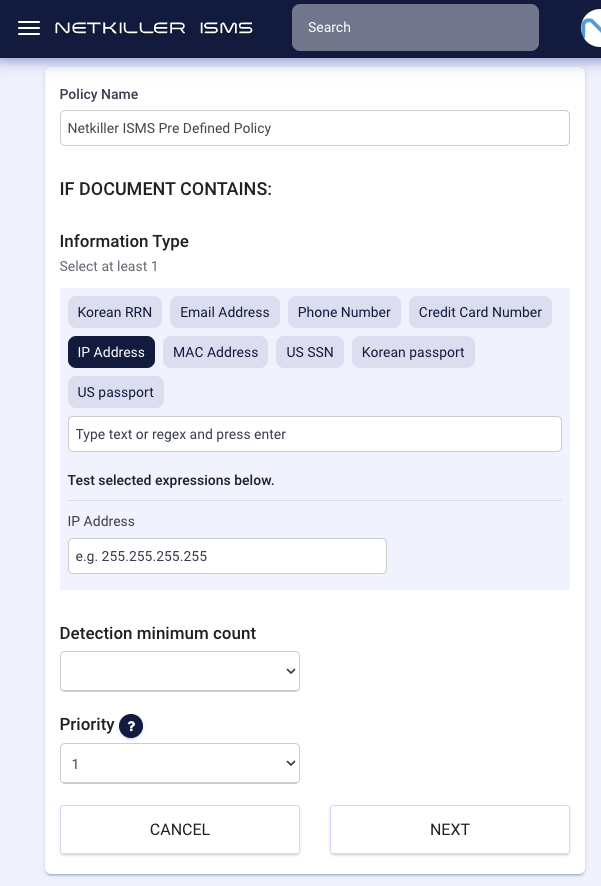
To understand data sharing status and protect data containing sensitive information, predefined DLP information types (such as IP addresses, MAC addresses, Korean/American passport numbers, etc.), real-time display of external sharing and public status of drive files, and Netkiller ISMS DLP’s GWS log triggers have been introduced.

The Netkiller ISMS 4.1 version includes various enhancements, such as improved drive log and data retrieval speeds, better OCR recognition and processing, and an improved responsive UI for tablets and mobile devices.

New Features

  • High-speed Drive Full Scan option:
    • An option has been added to perform a full scan focusing on metadata such as sharing information, excluding the contents of the files. This allows for more than 100 times faster scanning while monitoring important security aspects.
  • Shared Drive Permissions scan:
    • ISMS 4.1 has been upgraded with the capability to scan permissions for all shared drives within the domain. This feature allows for the verification of permissions for each shared drive, ensuring that access to sensitive information is granted only to authorized users.

Improvements

  • Full Scan
    • Full Scan Download function: Improvements have been made to allow for the downloading of large-scale full scan results, making it easier to analyze data and take necessary actions.
    • Full Scan Progress Visibility: The progress of the full scan is displayed in percentage in a progress bar, providing a clear representation of the scan’s completion status.

  • Drive Activity logs search, retrieval speed and event details divisions
    • Improved speed of Drive Activity search and retrieval
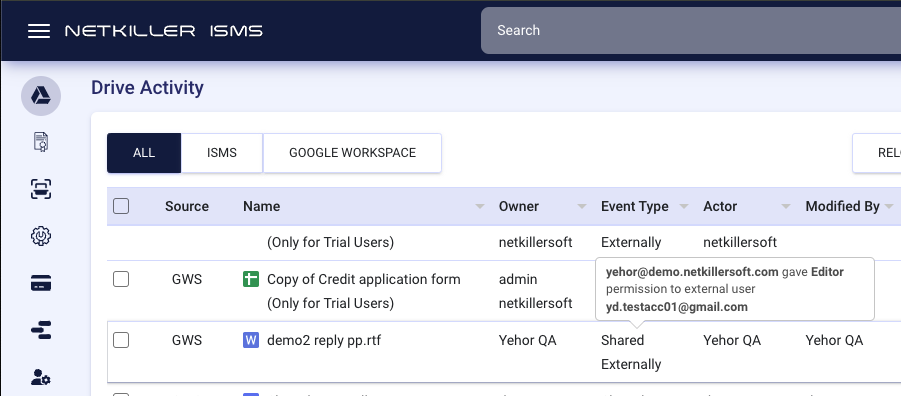
    • The labeling of drive activities has been improved. Previously, events were simply marked as “Shared,” but now they are more specifically categorized as “Shared externally” or “Shared publicly,” providing clearer insights into data sharing practices.

  • OCR
    • Improved Image Processing: The processing of images with white backgrounds and clear fonts/texts has been improved, leading to higher OCR accuracy.
    • Detection of Text alongside Objects: For images that contain text along with other objects, this feature detects the text and improves accuracy.
    • Handwritten Text Recognition: Simple fonts and clear handwritten texts can now be recognized through OCR.
    • Automatic Image Alignment: If an image is not properly aligned, it automatically rotates to the correct orientation to execute OCR.

  • Netkiller ISMS DLP 
    • GWS Drive Audit Log Triggers: Netkiller ISMS DLP now detects not only drive activities through Netkiller ISMS but also GWS drive audit log areas, offering audit trigger operations for all file activities in Netkiller ISMS/GWS, thus providing an additional layer of security monitoring.
    • Predefined DLP Policy Types: New predefined Data Loss Prevention (DLP) information types such as IP addresses, MAC addresses, Korean passport numbers, U.S. passport numbers, and U.S. SSNs have been added. This expansion helps in better identifying and protecting sensitive information.

  • UI / UX 
    • The UI has been improved for tablets and mobile devices to be more responsive.

Fixes

  • Drive Activity Log: 
    • The detection of drive activities for externally owned files has been enhanced.
  • Netkiller ISMS DLP 
    • Issues with DLP visibility, DLP trigger operations, and reactivation of revision archiving have been resolved.
  • Miscellaneous Fixes
    • Various improvements have been made to enhance the overall functionality and performance of Netkiller ISMS.

Example Impacts of Updating to Netkiller ISMS 4.1

Example of the Effectiveness of the Shared Drive Permission Scan Feature:

A marketing team member accidentally granted write permissions to a shared drive folder containing important customer information to all company employees.

With the shared drive permission scan feature of Netkiller ISMS 4.1, administrators can quickly identify and correct this permission setting error, preventing the risk of sensitive customer information leakage in advance.

Example of the Effectiveness of the Ultra-Fast File Metadata Scan Feature:

An employee who is planning to resign attempts to mass-copy thousands of files, including the company’s trade secrets, to a personal USB drive.

With the ultra-fast file metadata scan feature, the system quickly identifies the potential for this data breach and detects the user’s mass copying attempt, preventing the leakage of important information and protecting the company’s competitive edge.

Example of the Effectiveness of Enhanced Drive Activity Log Events:

If an employee accidentally shares an important file externally, previously it was simply marked as “Shared,” making it difficult to accurately determine whether it was shared inside or outside the domain.

With the improved feature, it’s now labeled more specifically, such as “Shared externally,” allowing administrators to quickly identify the issue and take necessary actions. This enhancement effectively manages inappropriate data sharing and reduces security risks.

Example of the Effectiveness of the Strengthened OCR Feature:

An employee in the accounting department scans a receipt image containing a customer’s name, address, and credit card information.

With the enhanced OCR capability, the system accurately recognizes text within the image and automatically extracts sensitive information, allowing it to be processed in accordance with DLP policies. This strengthens the protection of personal information and ensures compliance with regulations.

Example of the Effectiveness of Expanded DLP Information Types:

An employee in the development team accidentally uploads a GitHub repository file containing the company’s source code to Google Drive and sets it to public.

With the expanded DLP information types, the system can identify data such as source code and block public sharing or send a warning message. This protects the company’s intellectual property and helps it maintain its competitive edge.

Example of the Effectiveness of Expanded Trigger Operation Policies:

A hacker attempts to delete important files stored on Google Drive after hijacking a user account.

Netkiller ISMS supports trigger policies including GWS Drive Audit logs. It detects suspicious activities within the GWS Drive and immediately alerts the administrators. This prevents data loss and minimizes damage through prompt response.

In Closing:

The upgrade to Netkiller ISMS 4.1 significantly strengthens the data security of Google Drive. It effectively enhances corporate information security by proactively preventing and blocking the risk of data breaches in various situations!

If you have any questions or concerns, please send an email to kst@netkiller.com.

Sincerely,

The Netkiller ISMS Team

Hello everyone. This is Netkiller.

Netkiller is committed to prioritizing the secure protection and management of our customers’ valuable information. On December 19, 2023, a phishing attack targeting SendGrid users led to the theft of Netkiller’s SendGrid account, resulting in the distribution of spam emails using the Netkiller domain. We immediately responded to this security breach, ensuring that no data or customer information was leaked. It was identified that 39 recipients(Not Netkiller Customers) opened the spam message. Netkiller sincerely apologizes to those who received these unauthorized emails and is dedicated to implementing measures to prevent any such incidents in the future.

Incident Summary:

On December 19, 2023, around 10 AM KST, a Netkiller employee received a phishing email disguised as a SendGrid service notification. The phishing email contained a fake login page, through which the employee’s account credentials, password, and two-factor authentication details were compromised. Although the employee quickly recognized the email as phishing and reset their account password within minutes, the SendGrid API was stolen, leading to a mass distribution of spam emails. Immediate action was taken to address this bulk mailing, and the issue has now been resolved, with no further unauthorized mailings occurring.

Description of Damages:

  • A temporary SendGrid account used by Netkiller was compromised through a phishing email, leading to the theft of SendGrid API information.
  • Spam emails were sent out to various email addresses using this API.
  • The spam emails were sent to a total of 16,277 random email addresses, and among them, 39 individuals clicked on the phishing link.

Measures and Improvements:

Netkiller has taken measures to ensure that such incidents do not occur again in the future, including enhanced security training on phishing and spam emails, and implementing additional account authentication and management systems. We sincerely apologize for the concern this has caused to our customers and those who received the fraudulent emails.

Inquiries and Support:

If you have any questions about our compliance policy, please contact us at support@netkiller.com

We appreciate your patience, understanding, and ongoing support while we address this incident.

Sincerely,

The Netkiller Team

Hello everyone. This is the Netkiller Support Team.

At Netkiller Inc., we have always strived to protect and manage customers’ information. However, due to a human error, we regret to inform you that on Sunday, December 10, 2023, an email containing instructions for Google Workspace administrators’ two-step authentication intended for a specific client was mistakenly sent to some other clients. Netkiller sincerely apologizes to all our clients and promises to take the following measures and make efforts to prevent such incidents in the future.

Incident Summary:

On December 10, 2023, around 2:10 PM KST, a Netkiller customer support representative accidentally CC’ed an email to other customers while providing instructions for a GWS administrator’s 2-step authentication. As a result, one customer’s email contents were partially exposed to Netkiller clients.

Exposed Information:

  • Basic contact information specified in the email footer of the client
  • Instructions for setting up GWS administrator’s two-step authentication (excluding specific client-related details; the instructions contained general technical guidance)

Measures and Improvements:

Netkiller has taken measures to implement a mandatory internal approval process for mass-sent emails to prevent such incidents from happening again in the future.

We sincerely apologize once again for causing concern to our valued customers. 

Inquiries and Support:

If you have any questions regarding Netkiller’s security compliance policy, please don’t hesitate to contact us at support@netkiller.com.

On August 2nd, Netkiller sponsored and participated in TD Synnex’s 10th annual Google Summit on the Road hosted in Austin, TX, live music capital of the world.

Netkiller pitched and showed off various features of “netkiller ISMS,” our Google Workspace MSSP solution, to over 30 partners of the Texas-based general distributor company TD Synnex.

At our booth, we showed a demonstration of netkiller ISMS’s main functions including the Google Drive full scan, the automated detection system using keywords and regular expressions, and our robust unlimited tracking of revision and version history. We received a large positive response with attendees displaying significant interest in our solution. Notably, many of our booth’s visitors took a particular interest in how netkiller ISMS can fill the gap between Google Workspace and enterprise-level security compliance requirements.

TD Synnex reseller attendees could also receive a copy of netkiller ISMS’s white paper and manual and sign up for a free version of netkiller ISMS which lasts until the end of this year.

Check out https://netkiller.com/dlp/ for more information about netkiller ISMS’s different functions.

Drawing from the insights gained at this event and the valuable relationships formed with our partners, we are committed to further enhancing our efforts in providing safer and more tailored security solutions (MSSPs) to support our customers all over the world in delivering cloud security services.

Scroll to Top